Table of Contents
Your first session
Anime vs Anime combines collecting fighters with side-view battles. The developer lists more than 80 fighters, each with moves, an ultimate and an awakening. You can control the fighter or choose Auto Fight. Begin by learning one fighter before spending your entire coin balance on more packs.
- Open the official Roblox game by SellWater! and complete the introduction shown by your server.
- Inspect the fighters you already own and select one to learn.
- Use Training to practise the movement and attack prompts before entering competitive fights.
- Check the Summon menu for packs and the code field, then decide what you want to collect.
Read the battle screen
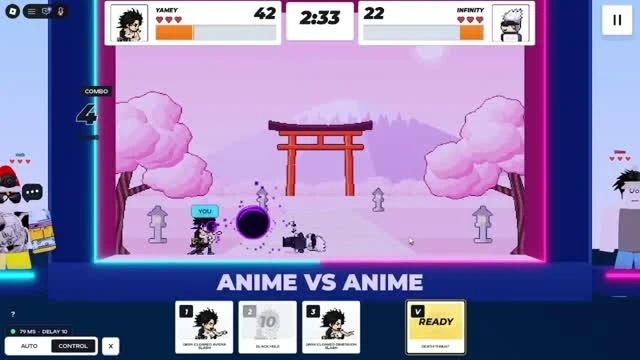
The recording shows fighter portraits and health bars across the top, a central timer and move cards along the bottom. Watch both health bars while moving. A move card can display a cooldown number, while the ultimate card can show a percentage or READY. The labels describe this recorded interface and do not establish every fighter’s damage or cooldown.
Choose a mode that answers your next question
| Goal | Mode to consider | What to check |
|---|---|---|
| Learn a move | Training | Its reach, recovery and whether your attack connects. |
| Focus on one opponent | 1v1 | Your spacing and use of defensive actions. |
| Play with a partner | 2v2 | The live queue and teammate arrangement shown in your server. |
| Watch the fighter act | Auto Fight | Whether you prefer its automated decisions to manual control. |
The official description confirms these modes. Queue requirements, ranked rules and 2v2 reward differences have not been verified. Read the live mode panel before committing to a queue.
Avoid early spending mistakes
- Practise an owned fighter before deciding it needs replacing.
- Inspect the current pack contents and price in the live Summon screen.
- Treat a code reward as a possible bonus until the game confirms redemption.
- Use the controls guide to separate movement, basic attacks, moves, ultimate and awakening.
Related Guides
Anime vs Anime Controls and Auto Fight
The desktop prompts visible in gameplay, how to switch control modes and what to check when an input fails.
Read guide →Anime vs Anime Combat: Cooldowns and Readiness
Use visible move cards and battle feedback to practise a fighter without relying on an unsupported tier list.
Read guide →